Figma to Code
Build prototypes that match your design - when precision matters

You’ve got a high-fidelity Figma file and you want it running in Lovable, v0, Replit, Bolt or Cursor. What is the cleanest way to get reliable code out of Figma without spending a week wiring things by hand or refining vibe-coded creation that only vagly resembles your desgn?
I teach designers and PMs to vibe-code, and that’s the top question that keeps coming up. I tested six paths - becuase there is no one best way to do it. I focused on two things: visual fidelity and meaningful code you can build on. Below is what worked, where it cracked, and when each option is worth your time.
If you don’t want to read, here is a 48-minute detailed comparison of all 6 methods.
Don’t judje too harsh, I’m still learning to record myself :-)))
The basics
AI prototyping still produces code. Even if you never open the files, you are generating HTML, CSS and JavaScript. In their pure “vanilla” form HTML, CSS and JS are rarly use in modern apps. They sit on frameworks that give you structure, components, routing, state, and patterns you can reuse.
Common web stacks you will hear about are React, Angular, Vue, Svelte. React is the most common framework for modern web apps, and most AI prototyping tools use it by default. In fact, Lovable and v0 and Figma Make (although, Figma Make is a special case) use exclusively React. Bolt, Repli, Cursor are a lot more flexible and can build in other frameworks.
Two more terms that we need to cover are Tailwind CSS and ShadCN.
ShadCN is a UI library with accessible, themeable basic components - buttons, dropdowns etc. Most of AI tools use it by default. In fact, v0 use it exclusively, Lovable can try to adopt Material UI, but it cannot find a good match, it often falls back to ShadCN components. And it’s fine, they mix okay that to ShadCN flexibile architecture.
Tailwind CSS keeps styling inside your React code using small utility classes. It also gives you a single place for tokens in
tailwind.configand global styles. Colours, type scale, spacing, radii and shadows live there.
Why this combo helps:
React + Tailwind + ShadCN gives you portable components. A card you generated in Lovable will usually render in v0 or Cursor with minimal fuss.
Tailwind tokens keep branding consistent without hunting through scattered CSS files.
ShadCN gives you sensible semantics so buttons behave like buttons, inputs behave like inputs, and accessibility is not an afterthought.
What this means for your workflow
If you want speed and a good base for iteration, aim your exports at React + Tailwind + ShadCN.
If your company stack is not React, decide what is more imporant for you:
if re-usable code, the choose a tool that can target your framework from the start
if fast idea validation, or treat the React export as throwaway prototypes.
Why designers should care about Tailwind and ShadCN (especially in the AI era) →
How I tested
I used my old design, an Events page and an Event details view for a hiking community. Parts of the file are clean and use Auto Layout and styles. Parts are messy on purpose, like a thrown-together table. That contrast shows how each exporter behaves in the real world, not in a perfect demo.
For each path I tried to:
Create the Events page from the design.
Add the Event details view into an existing project.
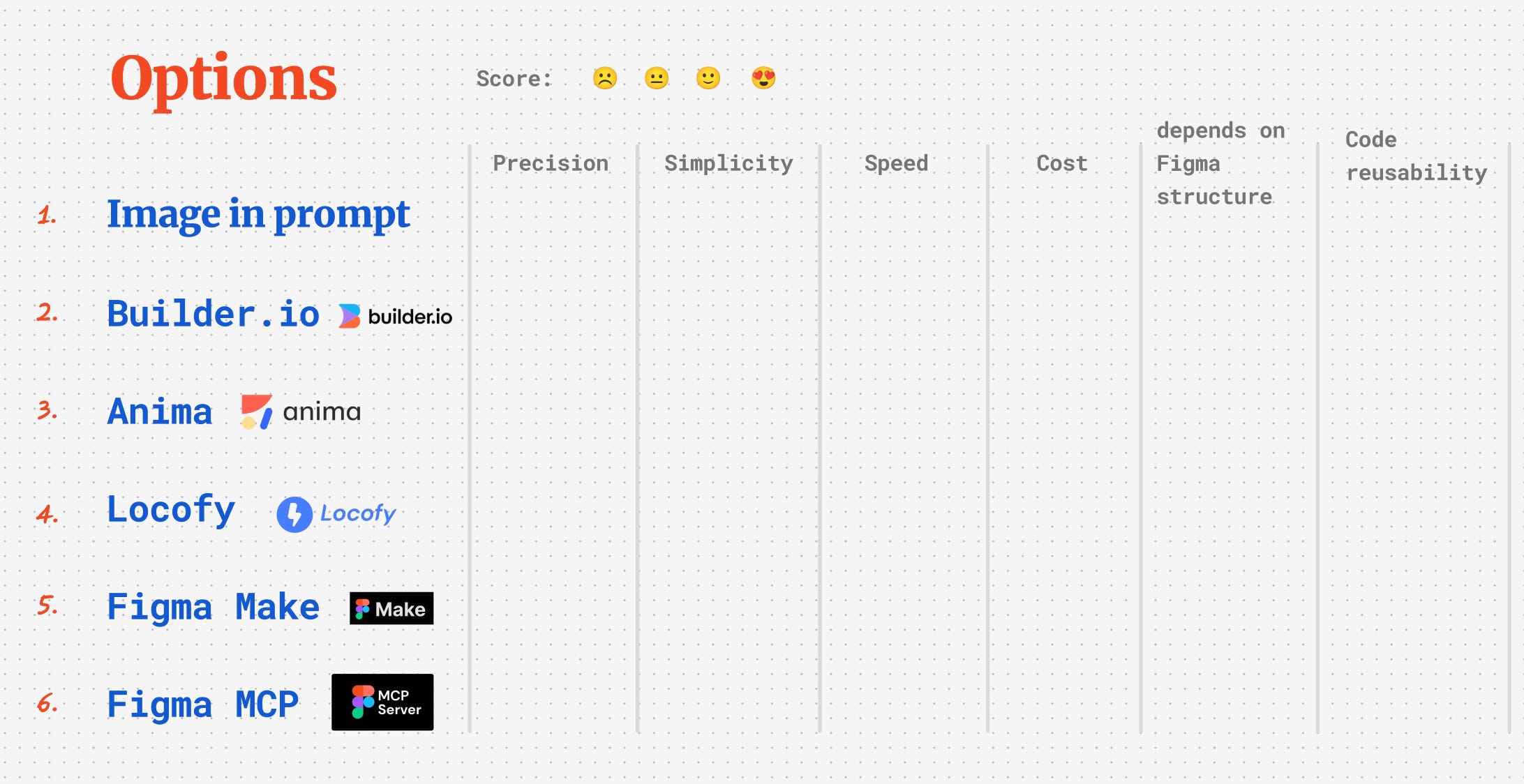
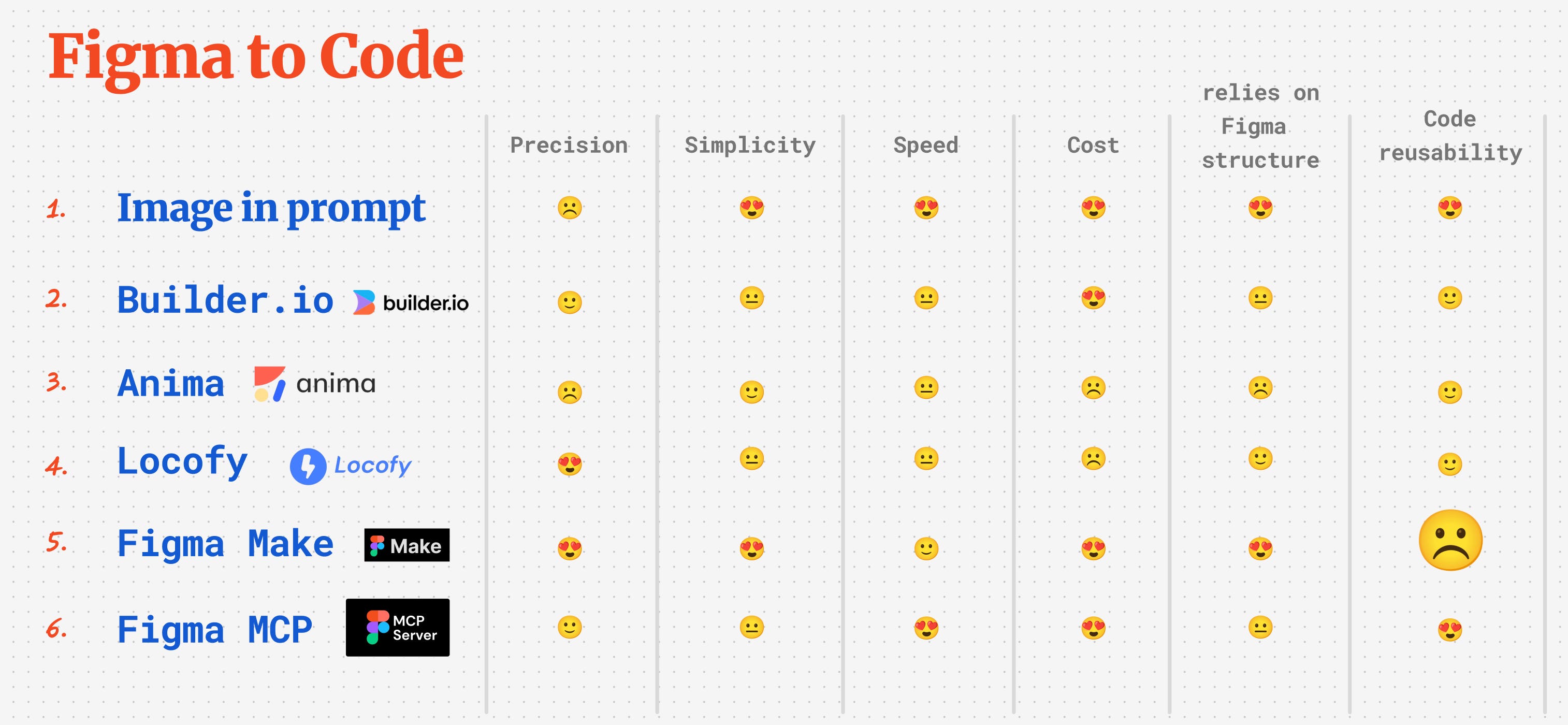
Note pixel precision, simplicity, speed, cost, how tidy Figma must be, and whether the code is reusable.
Option 1: Image in the prompt
How it works
Export a screenshot of your Figma frame and attach it to your prompt in Lovable. Ask it to implement the page.
What I got
Good vibe match. Not pixel-perfect. Basic interactivity out of the box. Often responsive because Lovable builds real components under the hood.
When to use
Early prototyping, brand exploration, quick scaffolds. Not for “make it look exactly like Figma”.

Option 2: Builder.io
How it works
Run the Figma plugin on a frame, export, then either open in Lovable as a new project or open in Builder and generate React with Tailwind to paste into an existing codebase.
What I got
Closer to the design than screenshots, but mostly static by default. Responsiveness mixed. The plugin UX is clunky. Expect some manual copy-paste when integrating.
When to use
Small components or single screens where you want quick React, free, and you are fine with a bit of glue work.

Option 3: Anima
How it works
Choose React, pick TypeScript or JavaScript, enable Tailwind, export code, then paste into your project.
Positives:
Easier and faster than Builder.io, shows code directly in Figma
More code settings to choose from, supports different frameworks
Negatives
Free tier is limited, refuses to export more compex frames
When to use
Same use cases as Builder.io, + if you use different frameworks.

Option 4: Locofy
How it works
Run Locofy Lightning on a frame, let it analyse, then export React with Tailwind. It breaks pages into components and flags layout issues. Paste the bundle into Lovable or your app.
Positives:
The strongest fidelity of the plugin exporters.
Handled messy Figma pretty well
Nuanced code settings, supports different frameworks
As its target audience are developers, it allowes of flexibility, but might be overwhelming to non-coders
Negatives
Free credits disappear fast, which is fair for the quality.
When to use
You need a high-accuracy export now and you are happy to pay. When set up well, can be a good base for a efficient workflow.

Option 5: Figma Make
How it works
Prompt inside Figma Make and it “implements” the frame directly.
Positives:
Visual match can be very close.
Negatives
Interactivity is limited
GitHub or Supabase hooks were unreliable for me.
The code is heavy on absolute positioning and non-semantic layers. making it absolutely unusable and not scalable. You won’t be able to turn it into a properly functional prototype, let alone hand over code
When to use
Visual demos where the code does not need to live beyond the demo.

Option 6: Figma MCP
How it works
Enable MCP in Figma Dev Mode, connect it in your IDE (I used Cursor), then ask it to convert frames into React using ShadCN and Tailwind. You can provide multiple frames for states and breakpoints, and you can target a live repo. Commit in the IDE, pull in Lovable, keep building.
What I got
Most flexible by a distance. You can ask for structure, clear component boundaries, responsive rules, Tailwind config from tokens, and reuse existing code in your repo. No credit burn in Lovable while you shape components in Cursor. Fidelity depends on how well the Figma is structured, which is reasonable.
When to use
Production-adjacent prototypes, teams working in a real repo, anyone who wants a workflow that compounds.

Quick decision guide
Need speed and you are still sketching ideas: Image in the prompt.
Want decent fidelity with minimal setup and zero cost: Builder.io.
Have tidy files and want configurable export for different frameworks: Anima.
Need the most accurate plugin export and do not mind paying: Locofy.
Only care about a visual demo inside Figma: Figma Make.
Want code you can keep, in a real repo, with proper components: Figma MCP.
My recommendation: invest in Figma MCP. Set it up once, and it pays you back on every project. Then use Lovable for previews, sharing, auth, publishing, Supabase, and the rest of the ecosystem. Locofy is my paid shortcut when I need pixel-tight output in a hurry.
Prompts you can steal
Cursor with Figma MCP
Convert this Figma frame into a single React component. Use ShadCN and Tailwind. Make it responsive. Use semantic HTML. Keep component names clear and small.Final thoughts
Learn how to design directly in code, or vibe-code, reducing dependence on Figma. The more comfortable you’ll get with it, the more you’ll see polishing mockups as a redundunt step in your workflow. You’ll keep control of components, avoid massive rewrites, and your prototypes feel close to the real thing.
If you have pushed any of these exporters further than I did, especially on messy files, I want to hear it. Share your workflow, tricks and failures. The best part of this space is swapping notes and stealing the good bits.
Want to master building with AI
Whether you’re a designer, product person, or any anybody else who wants to embrace the power of building with AI, I run a 4-week intensive course for you. it’s not a shallow introduction to vibe coding tools, we’ll cover different scenarios from building with your brand assets and design system, building complex flows with dynamic data, prompting strategies for different goals and scenarios, and finally, we will build some AI-powered features with models like Gemini, ElevenLabs and OpenAI.
I offer 40% off to all Substack subscribers with the code “SuperEarlyBirdSubstack”.
Thank you for sharing this. I’ve also found Supabase hooks in Figma Make unreliable. It’s great to have these comparisons.
Thanks for sharing.
If you’re going back and fourth between Lovable and Cursor, what activities do you find are better in one platform vs. the other?